AI MEETING ASSISTANT

Every meeting

Clear next steps

Notably turns your meeting conversations into clear summaries, decisions, and action items — so your team knows what happens next.

Less note-taking. Fewer missed follow-ups.
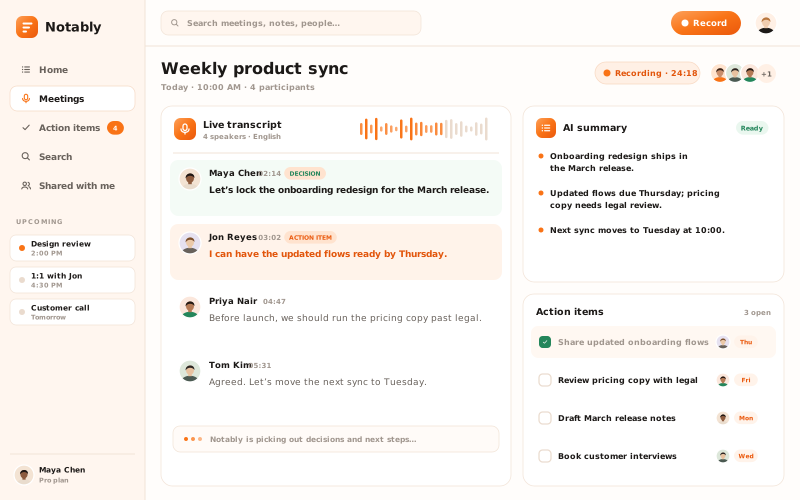
Notably dashboard showing a live transcript, AI summary and action items

Everything important, captured.

From meeting notes to next steps, keep the details that matter without writing everything down.

Meeting summary card with three numbered takeaways

AI Meeting Summaries

Get the key points from a conversation without replaying the entire meeting.

Live transcript with speaker messages and a highlighted key moment

Accurate Transcripts

Find what was said and revisit important moments when you need them.

Decision card with a confirmation badge and supporting context

Decisions, Made Clear

Keep track of the decisions your team made and the context behind them.

Layered task cards with owners, due dates, and a completed checkbox

Action Items That Stick

Turn meeting commitments into clear tasks, owners, and due dates.

Search field with a typed query and two matching meeting excerpts

Searchable Meeting Notes

Find key information from previous conversations without digging through long notes.

From conversation to clarity.

See how one meeting becomes a useful summary your team can act on.

1

Conversation

2

Transcript

3

Summary

4

Decision

5

Action items

Customer onboarding review

Today · 32 min · 3 speakers

Transcript

Notes

19:52

SB

Sara Bell

18:02

The setup steps are where most new accounts stall.

DM

Dev Mehta

18:40

Key moment

Then let’s cut the checklist from nine steps to five.

SB

Sara Bell

19:15

Agreed. I’ll draft the shorter flow this week.

LW

Lena Wu

19:48

I’ll update the help docs once it’s live.

Key takeaways

Generated from 32 min

Setup is the main drop-off point for new accounts.

Onboarding checklist shrinks from nine steps to five.

Help docs update after the new flow ships.

DECISION

Five-step checklist replaces the current nine.

ACTION ITEM

Draft the shorter setup flow

SB

Sara · Fri

From conversation to action.

Notably helps your team move from what was discussed to what needs to happen next.

STEP 01

Capture the conversation

Start with a supported meeting recording or import a recording, depending on the available workflow.

A recording panel with a live waveform and an imported recording

STEP 02

Find what matters

Notably organizes the conversation into key points, decisions, and useful summaries.

A highlighted transcript line turning into a summary

STEP 03

Move work forward

Review action items, assign owners, and keep track of what needs to happen next.

Next-step tasks with owners and due dates

Fits into the way your team works.

Bring meeting notes closer to the tools your team already uses.

MEETINGS

Zoom

Video meetings

Zoom

Video meetings

Google Meet

Video meetings

Google Meet

Video meetings

Microsoft Teams

Video meetings

Microsoft Teams

Video meetings

Notably

WHERE NOTES GO

Slack

Team chat

Slack

Team chat

Notion

Docs & wikis

Notion

Docs & wikis

Linear

Issue tracking

Linear

Issue tracking

What our customers love.

A simpler way to leave every meeting knowing what comes next.

I stopped taking notes during calls. The summary is waiting when I hang up, and it’s usually clearer than what I would have written.

Hannah K.

Product Manager

I stopped taking notes during calls. The summary is waiting when I hang up, and it’s usually clearer than what I would have written.

Hannah K.

Product Manager

The recap is ready before I’ve even closed the call.

Sofia L.

Operations Manager

Decisions don’t get lost between meetings anymore.

Ethan B.

Founder

Action items finally have owners. Our Monday follow-up went from twenty minutes to five.

Marcus O.

Engineering Lead

Action items finally have owners. Our Monday follow-up went from twenty minutes to five.

Marcus O.

Engineering Lead

Searching last month’s calls for a decision saves me from asking the same questions twice.

Aiko T.

Customer Success

Searching last month’s calls for a decision saves me from asking the same questions twice.

Aiko T.

Customer Success

Our team actually reads the meeting notes now.

Nina P.

Team Lead

A plan for every kind of team.

Start with the essentials and choose more capabilities as your team grows.

Free

For trying Notably on a few meetings.

$0

free forever

INCLUDES

Up to 5 meetings a month

AI summaries and transcripts

Action item suggestions

7-day note history

Pro

Most popular

For individuals who meet all week.

$12

per user / month, billed monthly

EVERYTHING IN FREE, PLUS

Unlimited meetings

Decision tracking

Searchable meeting notes

Unlimited note history

Team

For teams that share follow-ups.

$20

per user / month, billed monthly

FOR THE WHOLE TEAM

Everything in Pro

Shared team workspace

Owner and due-date tracking

Admin and member controls

Free

For trying Notably on a few meetings.

$0

free forever

INCLUDES

Up to 5 meetings a month

AI summaries and transcripts

Action item suggestions

7-day note history

Pro

Most popular

For individuals who meet all week.

$12

per user / month, billed monthly

EVERYTHING IN FREE, PLUS

Unlimited meetings

Decision tracking

Searchable meeting notes

Unlimited note history

Team

For teams that share follow-ups.

$20

per user / month, billed monthly

FOR THE WHOLE TEAM

Everything in Pro

Shared team workspace

Owner and due-date tracking

Admin and member controls

A few things you might be wondering.

Quick answers to help you understand how Notably works.

GET STARTED

Make every meeting count.

Leave the note-taking behind and focus on the work that follows.

A transcript snippet becoming a summary and a completed action item